
Docs /Getting Started
Welcome to LeaRes
LeaRes is a digital medicine platform that combines medical imaging analysis with computational fluid dynamics (CFD) simulation. Whether you’re a medical professional working with patient scans or an engineer designing medical devices, LeaRes provides tools for anatomical reconstruction, Digital Twin simulation, and research.
Intended Use and Regulatory Status
Read this before using LeaRes on real patient data. It applies to both workflows.
LeaRes is a stand-alone Medical Device Software (MDSW), CE marked, Class I, self-certified by MedLea Srl under Art. 52(7) MDR and classified under Rule 11, last paragraph of Annex VIII. No notified body is involved. The Declaration of Conformity is issued under the commercial name WeResp.
The declared intended use is deliberately narrow:
WeResp is a Stand Alone Medical Device Software (MDSW) intended for use, in a Professional setting, for: the Confirmation of the Consistency and Plausibility of collected data; Simulation and Modelling, with Digital Twin technology, for the purposes of study and investigation; the training of healthcare operators. WeResp does NOT provide diagnosis, which remains the exclusive competence and responsibility of medical personnel.
What this means in practice:
- LeaRes does not diagnose. It does not detect, classify, or grade disease. Diagnosis remains entirely the responsibility of the qualified medical professional.
- LeaRes does not plan or prescribe treatment. It does not recommend, evaluate, or predict the outcome of a surgical or therapeutic intervention for an individual patient.
- Anatomy yes, pathology no. The platform reconstructs and measures anatomical geometry. It does not produce findings about pathology; detection and quantification of pathological findings (nodules, emphysema, fibrosis, effusion) is outside the device perimeter and disabled.
- Simulation output is for study and investigation, not a clinical prediction about a specific patient.
Research Use Only modules
Some modules ship inside the same web application but sit outside the declared intended use and are labelled Research Use Only (RUO):
- Virtual Spirometry and Reinflation Analysis (Medical Workflow)
- Patient Insights (AI-generated findings, where enabled)
- Plaque / vessel morphometry
RUO output must not be used to inform a diagnostic or therapeutic decision about an individual patient. Chapters documenting an RUO module say so at the top.
Anyone working with patient data should also read Data Hierarchy, Intended Use, and Safety in the Medical Workflow section, and Limits of the AI Assistant before using AI features.
What is LeaRes?

LeaRes bridges the gap between medical imaging and engineering simulation, offering an integrated ecosystem for:
- Medical Image Analysis: Process DICOM CT and MRI scans with AI-powered segmentation
- 3D Reconstruction: Generate accurate 3D models from medical images
- Virtual Spirometry: Model respiratory mechanics on reconstructed geometry (RUO)
- CFD Simulation: Run high-performance computational fluid dynamics simulations
- Device Engineering: Design and test medical devices with realistic boundary conditions
The platform combines real-time 3D visualization, AI-based automatic organ segmentation and a GPU engine for multi-physics simulations.
Two Workflows, One Platform
LeaRes operates in two distinct modes, each tailored to specific use cases:
Medical Workflow (Patient Mode)
The Patient Mode is designed for medical professionals and researchers working with clinical imaging data.
Key capabilities:
- DICOM Import: Upload and manage CT/MRI scan series
- AI-Powered Segmentation: Automatically segment organs using deep learning models
- Manual Refinement: Fine-tune segmentations with interactive editing tools
- 3D Reconstruction: Generate high-quality surface meshes from segmented volumes
- Virtual Spirometry: Model respiratory mechanics from reconstructed lung geometry (RUO)
- Reinflation Analysis: Study lung re-expansion after a simulated resection (RUO)
Typical workflow:
DICOM Upload → AI Segmentation → Manual Refinement → 3D Reconstruction → Digital Twin AnalysisTip: Patient mode is intended for radiologists, pulmonologists, and medical researchers studying anatomical structures and respiratory mechanics.
Engineering Workflow (Project Mode)
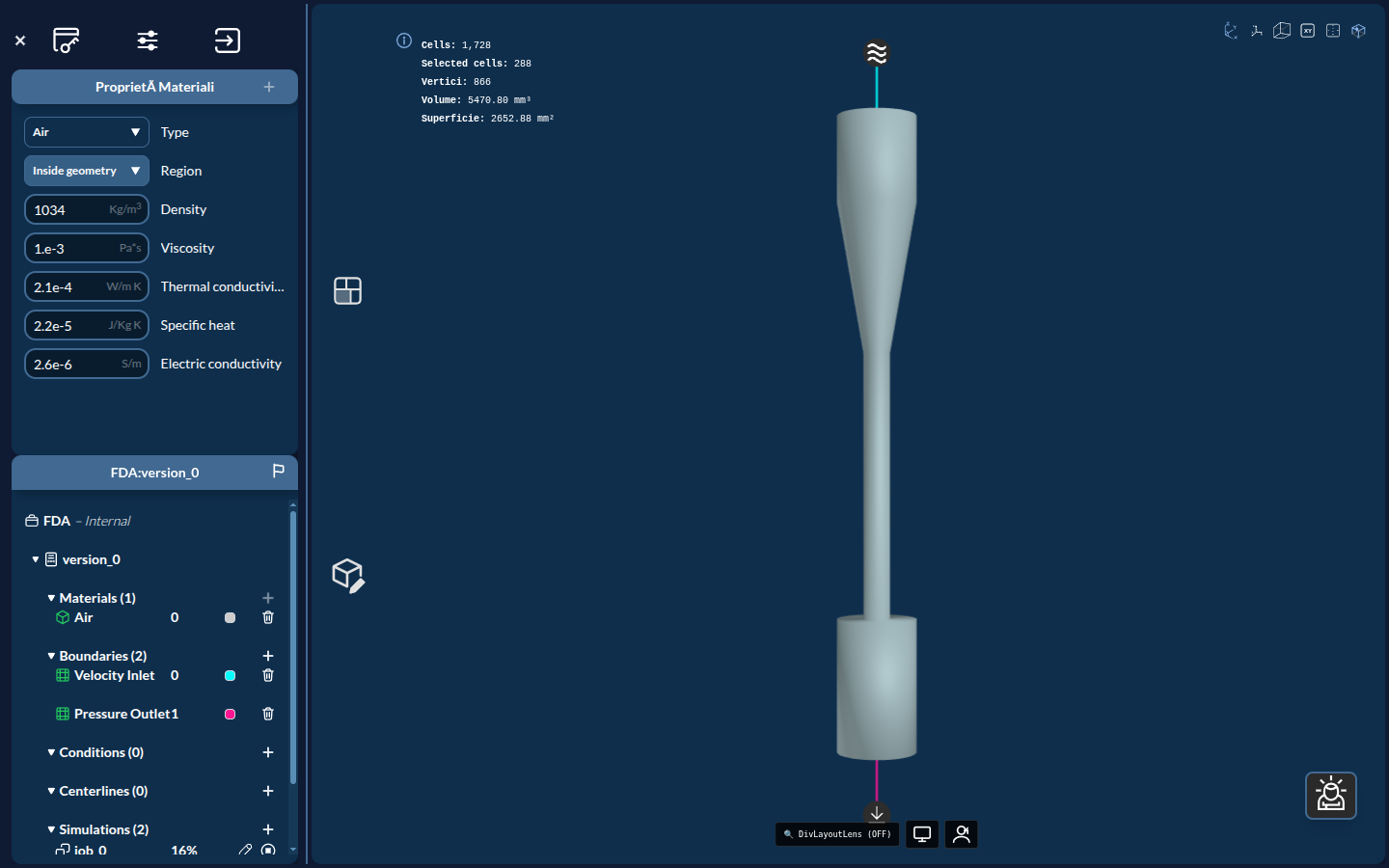
The Project Mode caters to engineers and researchers developing medical devices and conducting biomechanical studies. Instead of a patient anatomy, the viewer shows a device — such as the FDA benchmark nozzle below, loaded from the wiccaDATA → FDA project.
Key capabilities:
- Geometry Import: Load CAD models from STL, VTP files, or directly from OnShape
- Material Assignment: Assign a fluid material (Air, Water, Blood, Cerebrospinal, Urine) to the domain
- Zone Definition: Paint inlet/outlet zones on the geometry surface
- Boundary Conditions: Set inlet velocities and outlet pressures
- CFD Simulation: Run high-performance fluid simulations on GPU
- Results Visualization: Analyze velocity and pressure fields, with Surface LIC for flow visualization
Typical workflow:
CAD Import → Material Definition → Zone Assignment → Boundary Conditions → CFD Simulation → Results AnalysisTip: Project mode is designed for biomedical engineers, device manufacturers, and researchers studying fluid dynamics in medical applications.