
Docs /Engineering Workflow
Assigning Materials
Material assignment tells the solver which fluid fills your computational domain. LeaRes uses a single fluid per domain, chosen from a small library of validated fluids tuned for the flow solver. This tutorial covers the Materials panel, the available fluids, and how the values are expressed.
Choosing the Simulation Type
The fluid region, the materials and the boundary options all depend on the project’s simulation type, chosen in the Simulation Types panel.
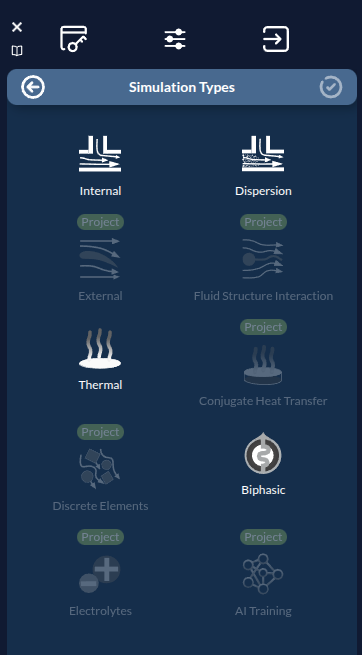
The standard offering includes Internal (flow inside the geometry), Dispersion, Thermal and Biphasic. The types marked Project (External, Fluid Structure Interaction, Conjugate Heat Transfer, Discrete Elements, Electrolytes, AI Training) are greyed out: they are not part of the standard offering.
The Materials Panel
The Materials / Material Properties panel controls the fluid for the current project version.
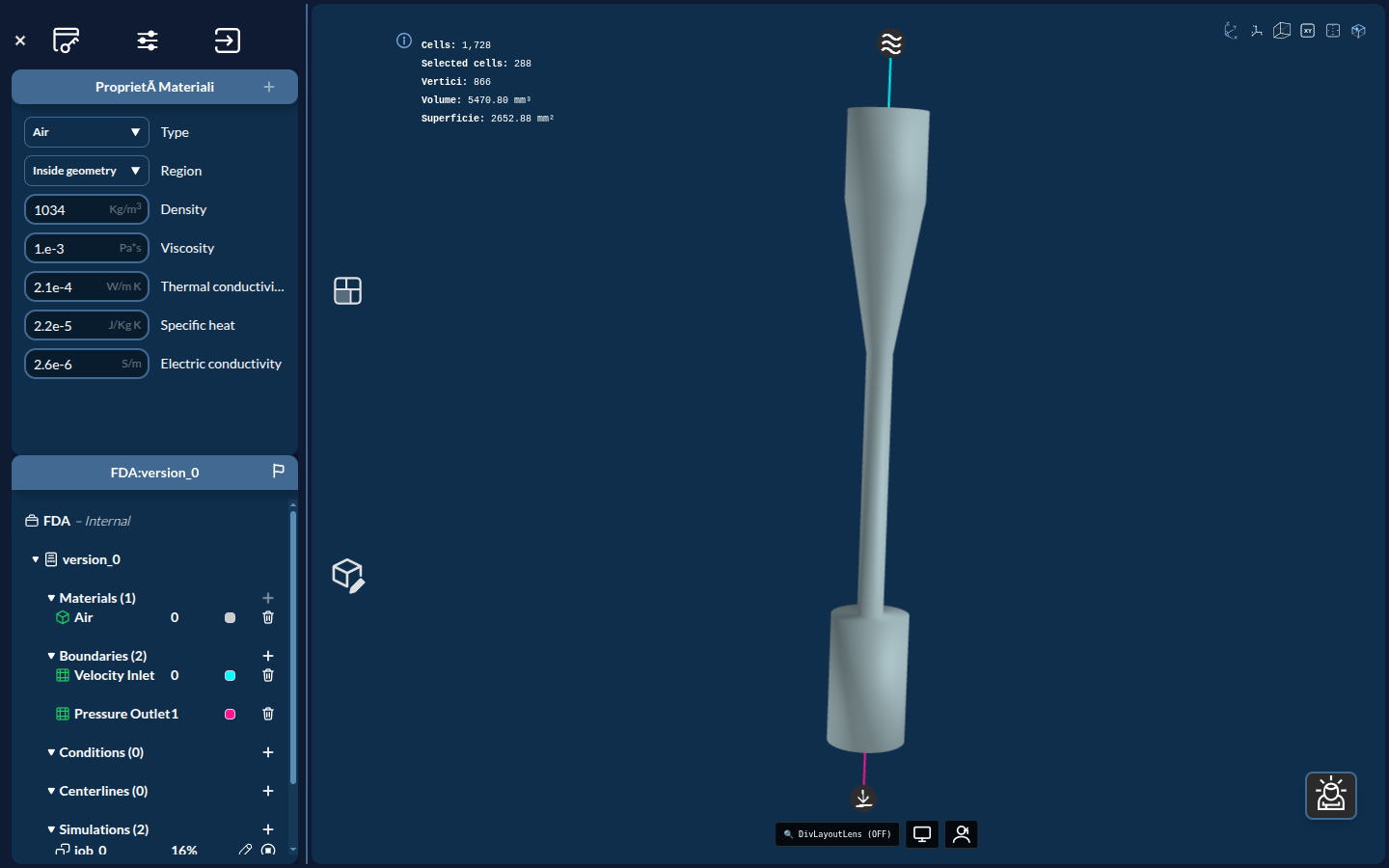
Step 1: Open the Panel
- Make sure your project version with defined zones is loaded
- Open the Materials (Material Properties) panel
Step 2: Check the Region
The Region field is read-only and simply reflects the project’s flow type:
- Inside geometry — shown for Internal flow: the fluid fills the interior of the geometry (blood inside a vessel)
- Outside geometry — shown for every other flow type: the fluid surrounds the geometry
To change it, change the flow type in the Simulation Types panel.
Selecting a Fluid
LeaRes provides five validated fluids. Exactly one fluid is assigned per domain.
| Fluid | Typical use |
|---|---|
| Air | Respiratory and ventilation flow |
| Water | Generic fluid dynamics, device testing |
| Blood | Cardiovascular and vascular flow |
| Cerebrospinal | CSF dynamics, hydrocephalus, shunt analysis |
| Urine | Urological flow |
To assign a fluid, select it in the Materials panel. Its properties are loaded and applied to the chosen region.
Tip: Pick the fluid that matches your anatomy or device context. For a coronary or aortic study, choose Blood; for an airway study, choose Air.
What the Numbers Mean
Selecting the fluid is what determines the physics. LeaRes passes only the fluid name to the solver, which then applies its own validated SI property set — for example Blood: ρ = 995.65 kg/m³, ν = 3.0 × 10⁻⁶ m²/s.
The numeric fields in the Materials panel are not used by the solver. They are stored with the project and used to tint the geometry, but editing them does not change the simulation. Do not treat them as calibrated values — some are placeholders that are not physically meaningful.
Rheology
- Air and Water are Newtonian.
- Blood, Cerebrospinal and Urine are modelled as non-Newtonian (Casson).
Single-Fluid Domains
The LeaRes engineering workflow assigns one fluid to the whole domain. Solid surfaces are represented through wall boundaries (covered in Boundary Conditions) rather than as separate solid materials. If your study needs a fluid not in the library, choose the closest available one — for example, Water as a generic Newtonian fluid.
Verification
Before continuing, confirm:
- A fluid is selected for the domain
- The region (Inside geometry or Outside geometry) matches your intent
Troubleshooting
Fluid Not in the Library
Problem: The fluid you need is not among the five available options.
Solution: Select the closest match. Water is a reasonable generic Newtonian fluid for many bench-style studies; Blood and Air cover the most common biomedical cases.
Wrong Region Applied
Problem: The fluid filled the wrong side of the geometry.
Solution: The region is not editable in the Materials panel — it follows the flow type. Change the flow type in the Simulation Types panel (Internal gives Inside geometry, the others give Outside geometry).
Next Steps
With the fluid assigned, you’re ready to configure how flow enters and leaves the domain. Continue to Setting Boundary Conditions.