
Docs /Active Learning Active Learning
Training and Proposals
This is the half of the loop that happens after the drawing: a set of completed readings is frozen, divided, trained on the site’s own card, and the resulting model hands the next cases back pre-annotated. It is done from one panel, and it needs the annotation-management grant — an annotator never sees it.
This chapter describes a loop that has turned exactly once, on the development machine, in September 2026. Every screen below is a real capture of that run, not a mock-up. What has not happened yet is a turn on real clinical volume at a site: treat the timings and the shape of the numbers as untested.
Where the Panel Is
Load a project by double-clicking it in the Active Learning projects list. The work tree on the left then shows the project’s branches, and two of them — Datasets and Trainings — carry a green play button on their header. Either one opens the same panel.
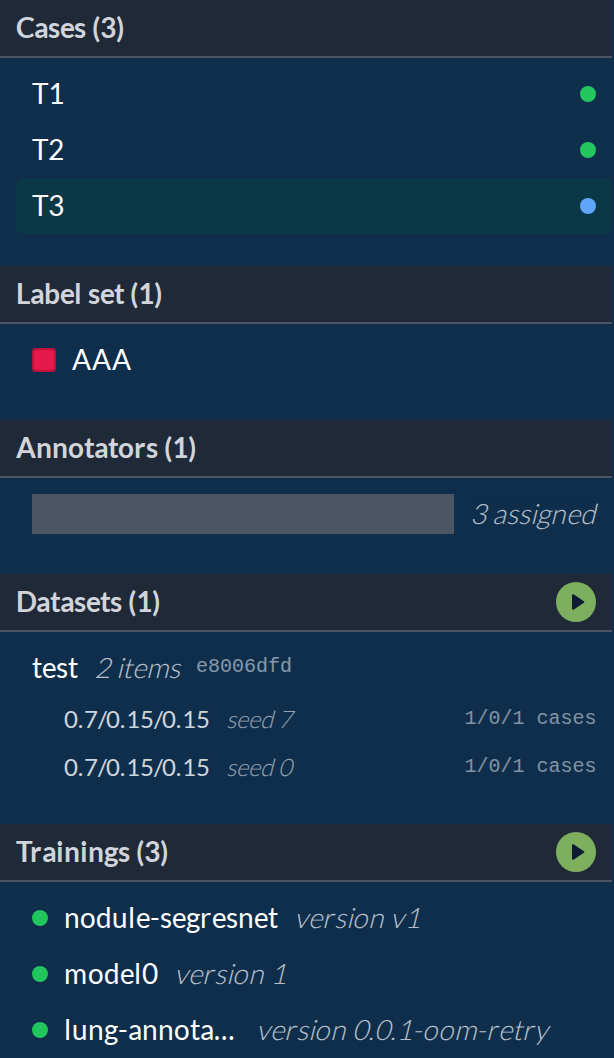
The button is the whole entry point, so it is worth naming what else the tree already tells you at a glance: each dataset line carries its item count and the first characters of its content hash, each split line its ratios and seed, and each training a coloured dot for its state — green for succeeded, red for failed, grey for cancelled.
The Panel
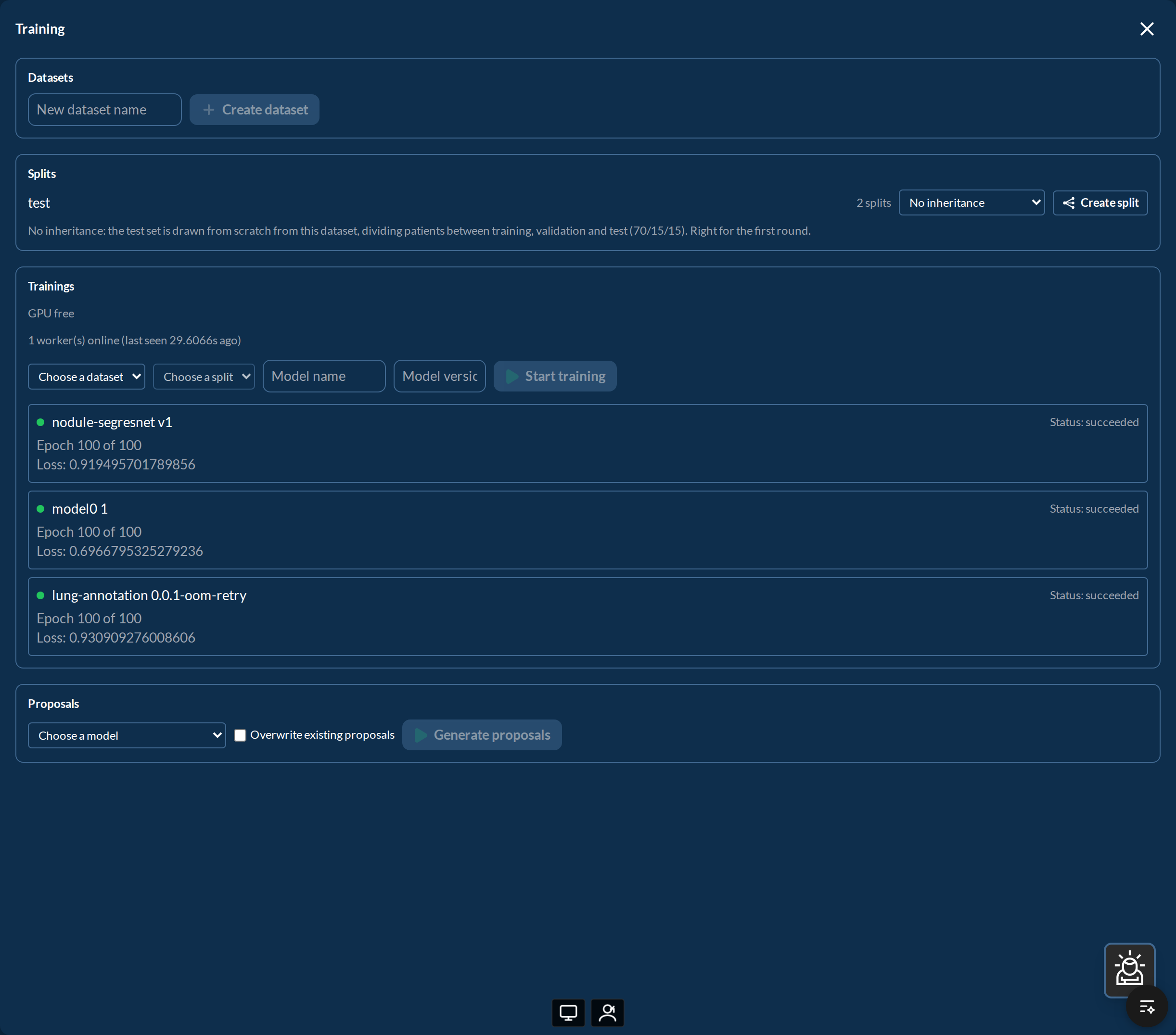
Four sections, in the order the loop uses them.
1. Create a dataset
Type a name and press Create dataset. It takes the cases completed so far and freezes them: the set is immutable from that moment, and it is identified by a content hash rather than by its name. Annotating more cases afterwards does not change it — it becomes material for the next dataset.
Freezing is what makes a training result defensible later: a model can always be traced back to the exact set of readings it came from, however much the project has grown since.
2. Create a split
Press Create split on a dataset row to divide it into train, validation and test, at
0.7 / 0.15 / 0.15 with seed 0. The division is deterministic — it comes from hashing
the seed together with the patient id — so the same dataset and seed produce the same split
on any machine, at any time. It also divides by patient, never by image, so no patient
can appear on both sides of an evaluation.
The dropdown next to the button, Inherit the test set from an earlier split, is the one choice on this screen that changes what a later number means. Pick an earlier split and the new one keeps that split’s test set untouched, dividing only the rest. Two rounds of the loop then evaluate on the same patients, and their scores can be compared. Leave it on No inheritance and each round is scored on its own test set — the numbers are still valid, but comparing them measures the test set as much as the model.
3. Start a training
Choose the dataset, choose the split, give the model a name and a version, and press Start training. The run is queued, not started: a training worker picks it up.
Above the form, two lines say whether that can happen at all:
- GPU free or GPU busy — held by …, the card’s state
- 1 worker(s) online (last seen Ns ago), or No worker is online right now
If nothing picks the job up, the run itself says why, in plain words: Queued: no training worker is running (a GPU alone is not enough), Queued behind … when another run holds the card, Queued: a worker is running, but has not picked up this job yet, or The worker has stopped responding. The distinction matters, because only the first of those is something a person has to fix. Running the worker is the section below.
While a run is alive it reports its own progress on the same row — cases done, epoch, loss, validation Dice — and Cancel ends it. When it finishes, the row keeps its outcome: a model name in green for a run that succeeded, a red row with the error text for one that failed. The two red rows in the capture above are real failures from the development machine, both out of memory on a card shared with other work, and that is exactly what a failure looks like here: the message stays on the row instead of disappearing into a log.
What this form does not set. A training started here begins from randomly initialised weights: the panel sends the dataset, the split, the name and the version, and nothing else — no starting model to fine-tune from, no epoch or time limit. Those exist in the interface underneath but are not exposed yet, so a run started from this screen on a handful of cases will produce a model that is worth nothing as a model. It is a way to exercise the chain, not yet a way to fine-tune one.
4. Generate proposals
Once a run has succeeded, its model appears in the Proposals dropdown. Choose it and press Generate proposals: another job goes on the same queue, and the same worker runs the model over the project’s cases. The result line reports how many cases were eligible and how many were skipped.
Overwrite existing proposals is off by default and should usually stay off: overwriting discards the comparison between the earlier proposal and the corrections already made on cases in progress, which is the measurement the whole loop exists to produce.
A model that cannot be used says so rather than failing silently — the weights are not on this machine (a model trained elsewhere is a reference, not a copy), the architecture is not one proposals can be built from, or no case is eligible.
From the annotator’s side nothing changes except the starting point: the case opens with the proposal already drawn, and the reading that comes out of correcting it is the new label.
Reading the Dashboard
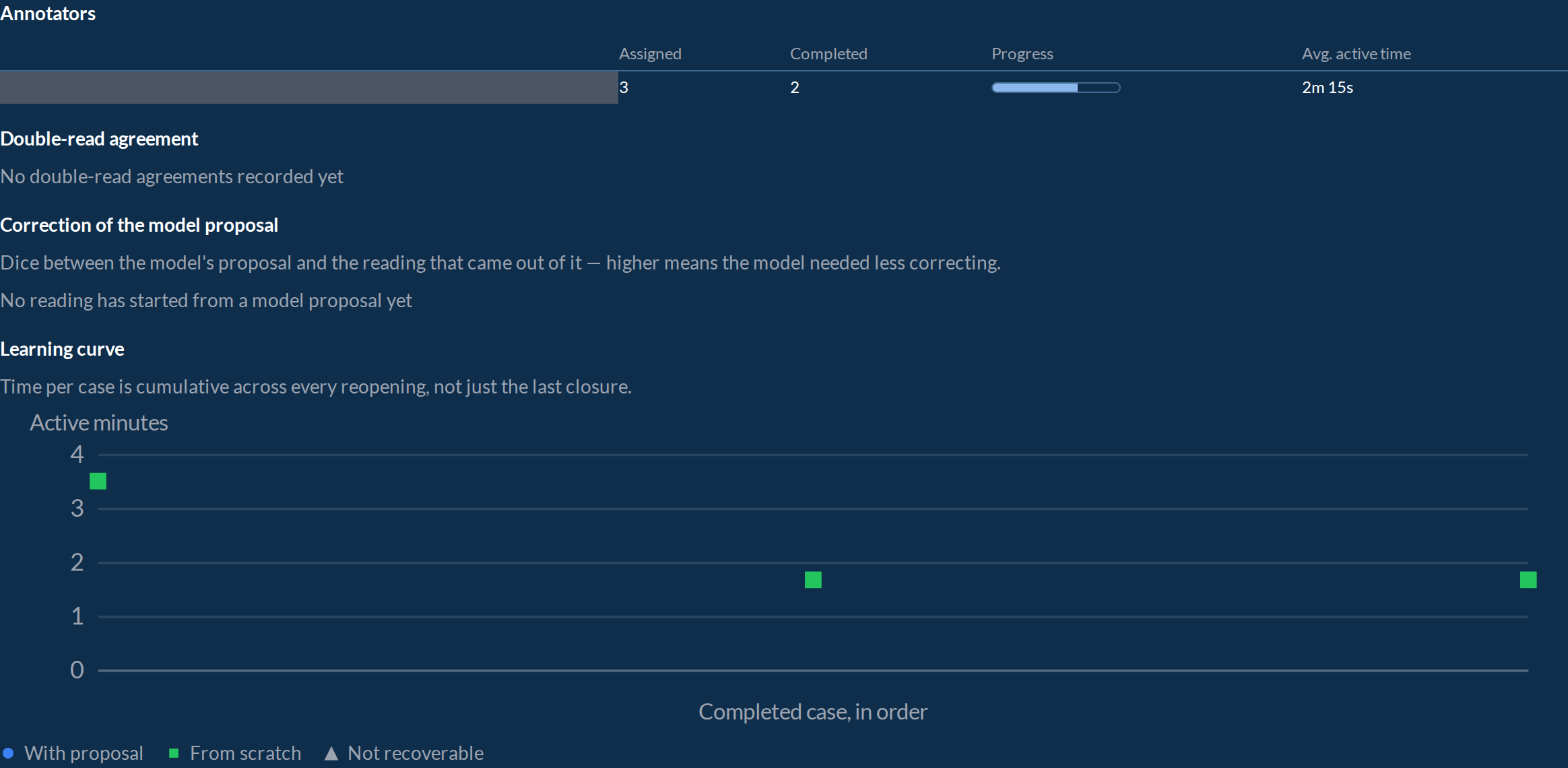
The right-hand panel of a loaded project is where the loop is judged.
| Section | What it answers |
|---|---|
| Annotators | assigned, completed, progress and average active time, per person |
| Double-read agreement | where two people read the same case, how much they agreed |
| Correction of the model proposal | Dice between the proposal and the reading that came out of it — higher means the model needed less correcting |
| Learning curve | active minutes per completed case, in the order they were completed |
The learning curve is the number that decides whether the loop is working: each point is one completed case, and points are marked With proposal or From scratch so the two populations stay distinguishable. If pre-annotation is earning its keep, the proposal points sit lower than the scratch ones. Time is cumulative across every reopening of a case, not just the last closure, so a case picked up three times carries all three sittings.
Running the Training Worker
Nothing in the panel starts a training by itself. The site runs a small process — the training worker — on the machine with the GPU; it asks the platform for queued work every 30 seconds, claims one job at a time, and reports progress while it runs. Without it, jobs sit in the queue and the panel says so.
What it needs first
| An account with the annotation-management grant, and MFA switched off | an automated process cannot answer an MFA challenge: with MFA on, the login returns mfa_required and no usable token. This is a configuration choice to make deliberately, not an error to retry |
| A GPU on that machine | a card shared with clinical work is workable, but the sharing is not automatic: the platform can be told the card is needed, and a run then stops at its own checkpoint and goes back to the queue rather than being killed. Nothing makes that reservation on its own when a clinical task starts — it is an explicit call, and until someone wires it to the clinical side a shared card means whoever asks first holds it |
| Weights reachable locally | the model registry stores a reference, not the bytes. A model trained on another machine cannot generate proposals here |
| Access to the project’s patients | without it the case reads are refused, and the refusals are correct |
Configuration
Three variables are required, and the process names the missing one and exits if any is absent:
LEXMED_BASE_URL          # where the platform answers, e.g. https://leares.hospital.example
LEXMED_WORKER_EMAIL
LEXMED_WORKER_PASSWORD
Optional, with the defaults the process itself uses:
| Variable | Default | What it does |
|---|---|---|
LEXMED_WORKER_NAME | <hostname>:<pid> | the name the worker announces itself with. It is shown in the panel, so give it a readable one |
LEXMED_TRAINING_ROOT | /var/lib/lexmed/training | where checkpoints and weights are written. Must exist and be writable, with room for them |
LEXMED_WORKER_POLL_SECONDS | 30 | how often it asks for work |
LEXMED_WORKER_HEARTBEAT_SECONDS | 30 | how often it reports progress and renews its hold on a job |
LEXMED_WORKER_LEASE_SECONDS | 300 | how long that hold lasts before the job is considered abandoned |
Never put the password in a command. It ends up in the shell history and in the logs. Put it in an environment file readable only by the account that runs the worker, or in the machine’s secret store.
Starting it
Run it by hand only to try it out — it is a loop that does not return, and a terminal session is not a service. The normal way is a systemd user service, which needs no root to install:
mkdir -p ~/.config/systemd/user
ln -sf <deployment>/lexmed-annotation-worker.service ~/.config/systemd/user/
systemctl --user daemon-reload
systemctl --user enable --now lexmed-annotation-worker
Then, once per machine and with root, so the service survives logout and reboot:
sudo loginctl enable-linger <user>State and logs:
systemctl --user status lexmed-annotation-worker
journalctl --user -u lexmed-annotation-worker -f
Within a minute the panel’s worker line changes from No worker is online right now to 1 worker(s) online, and any queued run starts.
Stopping it
systemctl --user stop is safe for work in progress: the worker treats the stop signal as an
interruption, writes its checkpoint, and the run goes back to the queue as suspended, to be
resumed on the next turn. Killing the process outright (-9) loses the epoch in progress.
It restarts itself if it crashes, and deliberately does not restart when the configuration is wrong — a missing variable or an unusable account makes it exit in a way that stops the retry loop, because that condition needs a person, not another attempt.
Where to Go Next
- Recalibrating Virtual Spirometry on Your Cohort — improving a model with your own patients without annotating anything
- Projects and Tasks — which task and network combinations close this loop, and which stop before the proposal